agent-spendingSeptember 16, 2026
What happens when your AI agent runs out of money mid-task?
The next paid step stops. Learn what happens to completed work, how to read Vaaya's funding errors, and how to continue without buying the same work twice.
The next paid step stops when your agent cannot afford it. In Vaaya's metered-tool flow, insufficient available funds produce a funding error such as credits_required before the new call reaches the provider, with no charge for that refused call. Earlier successful work can still be billed. To continue, your agent needs to preserve its results, resolve the funding problem and retry the unfinished step. Adding money does not, by itself, guarantee that the whole task resumes.

Original generated illustration of paused work. This is conceptual artwork, not an account screenshot or a transaction record.
What actually stops when the money runs out?
Think of a task as several purchases. An agent researching a trip might pay for a search, retrieve a few pages, then ask a model to assemble the itinerary. If there is not enough money for the next purchase, that step cannot start through the spending gate. The search results already returned do not become free, and the itinerary is not magically finished.
“Out of money” can also mean not enough for this request. An account with a few cents available might afford another search but not a video generation. Available spending power can include both the balance and eligible credit; a zero prepaid balance alone does not tell the whole story. Vaaya's account documentation explains the funding model.
The useful response is specific: what finished, what is saved, which step is blocked and what it needs. “Something went wrong” gives you none of that.
We tested an empty balance. Here is the result.
For this article, we executed Vaaya's spending-check logic with controlled test inputs: 0¢ balance, 0¢ available credit and a 1¢ request. The function returned credits_required. With the same request and a synthetic 1¢ balance, it returned ok: true.
{
  "ok": false,
  "code": "credits_required",
  "message": "You're out of credits. Buy a credit pack ($14 / $40 / $60) at https://vaaya.ai/balance to keep going.",
  "creditsUrl": "https://vaaya.ai/balance"
}
This is a controlled test of the spending check, not a live customer transaction. We supplied test balances. The successful second check means the request passes that check; it does not mean a provider ran, a real account was funded or a task resumed automatically.
Inspect the recorded test output or download the runnable reproduction. The reproduction runs offline with Node.js. It uses the extracted spending-decision function, with no changes to its decision logic, and needs no account or API key.
We also ran the existing dispatcher tests. The insufficient-credit case returned HTTP 402, made no provider call and wrote no debit to the test ledger. Tests for checking an existing job with an empty balance also passed. Read the test report, machine-readable results and source provenance. These are controlled tests; they do not reproduce every provider or a full task resuming after a real payment.
Recorded September 16, 2026, Pacific time. Download timestamps use UTC.
Is it an empty wallet, a missing card or a spending limit?
Read the returned error before adding money. These are different problems:
| Response | What it means | What to do next |
|---|---|---|
credits_required |
Currently available funds cannot cover the request. | Fund the account, or choose work that fits what remains. |
card_required |
Adding a card would unlock enough existing credit-line headroom. | Follow the card-setup link returned by Vaaya. |
over_max |
The quoted price exceeds the maximum permitted for this call. | Choose a cheaper call, or get authorization for a higher ceiling. |
api_key_limit_exceeded |
The developer key's spending allowance blocks this call. | Review the key policy and its reset period with the account owner. |
Buying a credit pack does not automatically raise a key's budget. Raising a per-call ceiling does not create funds. Changing keys to evade a limit is not a recovery step. Vaaya's spending controls describe how those permissions sit alongside the account balance.
How do you continue without starting over?
Save the completed work first. Keep returned files and source URLs, the outputs you need for the next step, any transaction or job IDs, and a short note naming the first unfinished step. Download generated media you need to keep; do not treat a provider's temporary URL as permanent storage.
Resolve the specific block. For insufficient credits, the account holder can buy a supported credit pack. Creating a top-up checkout link does not itself charge a card or add money. Complete the authorized payment, then check that the account reflects it. Current credit packs and billing terms are on the pricing page.
Continue from the saved step. Ask the agent to use the results it already has. If the earlier search finished, it usually does not need to buy that same search again merely because the next step failed. Recheck the next call's price and keep its ceiling explicit.
Here is a reusable instruction for your assistant:
If a paid step is refused, save completed outputs and tell me the exact error, the unfinished step and the cost needed to continue. Check existing job IDs before submitting new work. After the funding issue is resolved, continue from the saved step within my approved budget.
This is an instruction to the agent. It is not a claim that connecting Vaaya automatically adds durable checkpoints to every application.
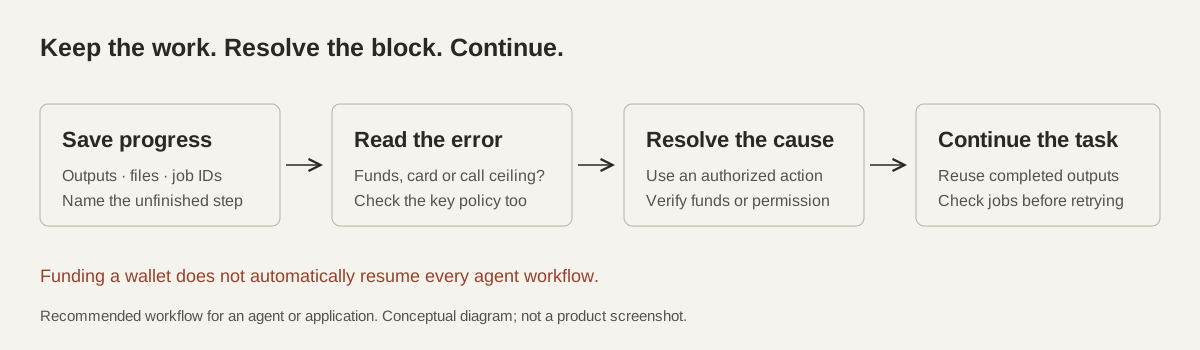
Recommended recovery workflow. Saving progress and deciding where to resume are responsibilities of the agent or application.
What if the video is already rendering?
Check the existing job before starting another. A new request refused before launch is different from a request already accepted by a provider. When Vaaya returns an asynchronous job_id, use result with that ID to retrieve its status and output. Calling use again starts new work. The tool reference documents this distinction.
Do not assume an empty balance cancels every running job. Metered compute is another case: sandbox uptime is billed over time, so close the session when you finish or stop the task. A paused conversation is not the same thing as a stopped sandbox.
A timeout also does not prove the provider did nothing. Establish the status of the original request before treating it as a safe retry.
Do you get the earlier money back?
A funding refusal does not refund successful earlier steps. If the agent bought a useful search result and then could not afford a generation, the search is still a completed purchase. The refused new call has no charge; work or metered usage already delivered can still have one. Vaaya's pricing page explains the distinction between per-call and usage-based billing.
You can inspect a real paid search and a separate price-ceiling refusal in the first article in this series. That example tests a call ceiling. The controlled test here specifically exercises insufficient available credit.
What does this look like with Instinct × Vaaya?
If you text Instinct on WhatsApp or iMessage, a helpful handoff would say what it has already finished and what it needs to buy next. For example: “I saved the research. The video step needs more credits. Here is the amount and the top-up link.” That wording is an example, not a captured chat. Instinct can complete an authorized top-up checkout using a card you have stored with it, but Vaaya does not directly charge the card inside Instinct. Confirm the pack amount, verify the credits arrived, then continue the unfinished step.
What should you set before the next long task?
Give the agent an overall budget and an explicit plan for a refusal: save its work, report the blocked step and wait for the necessary decision. Where you use a dedicated developer key, set its spending policy in the account as well as describing the budget in your prompt.
Ask for a cost estimate before an expensive step, and keep a margin for the remaining work. An estimate is not a reservation: other work on the same account can change what is available before the next call.
For the setup walkthrough, read how to give your AI agent a spending account. The goal is a task that can pause with a useful handoff and continue from known progress.
Questions
Does my AI agent lose its work when it runs out of money?
A funding refusal does not undo earlier successful calls. Your agent still needs to save the returned files, results and progress. Vaaya's spending check does not automatically create a checkpoint for an arbitrary task.
Am I charged for a call refused because I have no credits?
A new call refused by the spending check is not sent to the provider and is not charged. Earlier successful calls and metered usage already incurred can still cost money.
Will adding credits automatically restart the task?
Do not assume so. After the payment completes, check the account's available funds, then have the agent continue from the saved unfinished step. Check any existing job before submitting another.
What is the difference between credits_required and card_required?
credits_required means available funds cannot cover the request. card_required means adding a card would unlock enough existing credit-line headroom for it. Follow the specific response rather than treating both as a request to buy credits.
Does a zero balance stop a running video or sandbox?
Not necessarily. A refused new call and an already-running job are different states. Check the existing job ID; for a metered sandbox, explicitly close the session when finished or stopping.