AI videoSeptember 28, 2026
Why Vaaya’s Hotel Lobby recipe is built for the Migos AI trend
See the supplied Vaaya Hotel Lobby video beside an H3 Max sample, compare photographic FLUX and Nano Banana Pro images, and learn how Vaaya builds prompts for each character.
The appeal of the Migos AI trend is immediate: put yourself and a friend into the Hotel Lobby performance, keep the energy, and make the clip unmistakably yours. The hard part is keeping it yours once the performers start moving.
A face has to survive a turn. Two identities have to stay separate. Your outfit should carry into the performance. The camera, gestures and soundtrack have to work together.
That is the standard behind Vaaya’s Colors / Hotel Lobby recipe. We build for a best-in-class Hotel Lobby experience by treating the whole performance as the product: a model selected for this edit, a prompt built around each character’s uploads, and a finished video with the original audio restored. You bring the people. The recipe handles how they fit into the performance.
The comparison: the same people, different creative treatments
The photos below provide the character references for our new image samples and H3 Max video. The leather-jacket performer is assigned to the viewer’s left; the blue-blazer performer is assigned to the right, matching the supplied Vaaya example.
| Left performer reference | Right performer reference |
|---|---|
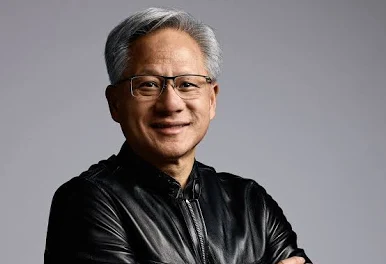 |
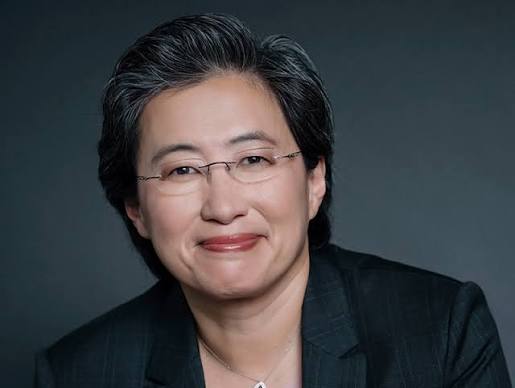 |
These are AI-generated portrayals, not recordings of the pictured people performing. The Vaaya video is an existing sample supplied for this article. We generated the H3 Max clip and the image variations separately.
| Stage | Comparison treatment | Vaaya demonstration |
|---|---|---|
| Character images | FLUX.2 [klein] 9B, prompted for a photographic portrait with light editorial polish | Nano Banana Pro, prompted for natural lighting, skin texture and realistic clothing |
| Video | New MiniMax H3 Max generation through fal, using the two uploaded photos directly | Supplied Vaaya / ReAPI example, embedded without a new ReAPI generation |
| Performer placement | Leather jacket on the left; blue blazer on the right | The same left/right arrangement in the supplied video |
| Duration | 7.29 seconds returned from a seven-second request | 25.5 seconds in the supplied file |
The image prompts use different photographic treatments. FLUX asks for light editorial polish; Nano Banana Pro emphasizes natural lighting and surface texture. This shows the effect of model choice plus creative direction. The samples are not attributed to competing platforms, and the differing video inputs and durations make this an illustrative comparison rather than a controlled benchmark.
Start with the look you want to keep
FLUX: photographic with a polished finish
The FLUX brief asks for believable proportions, soft studio lighting, natural hair and clothing detail, with a lightly retouched finish. The result should read as a photograph, with a subtle AI-polished look.
Nano Banana Pro: realism in the details
The Nano Banana brief asks for soft studio lighting, believable shadows, age-appropriate skin texture, individual hair strands and visible leather or fabric grain. For a performance that should feel photographic, those are the details we want to carry into motion.
| FLUX — photographic, lightly polished | Nano Banana Pro — realism-directed |
|---|---|
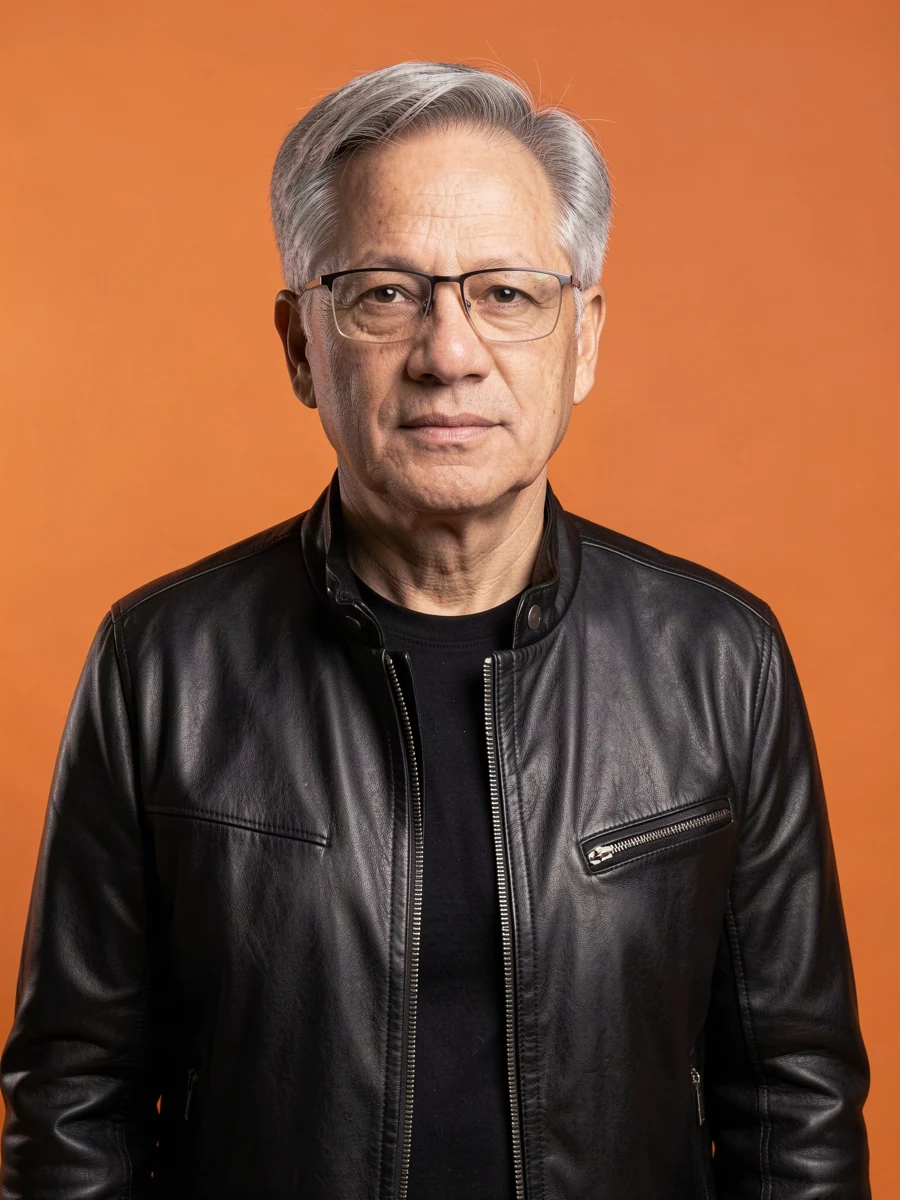 |
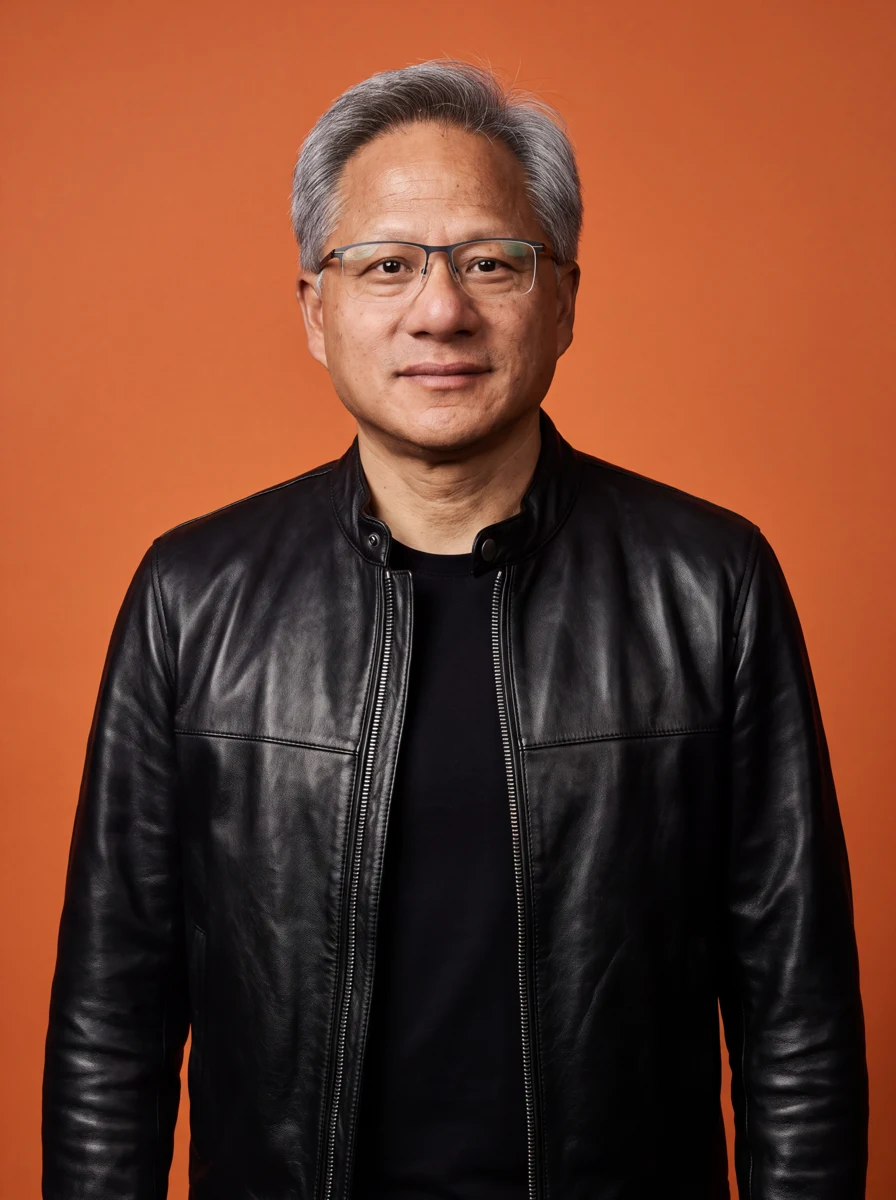 |
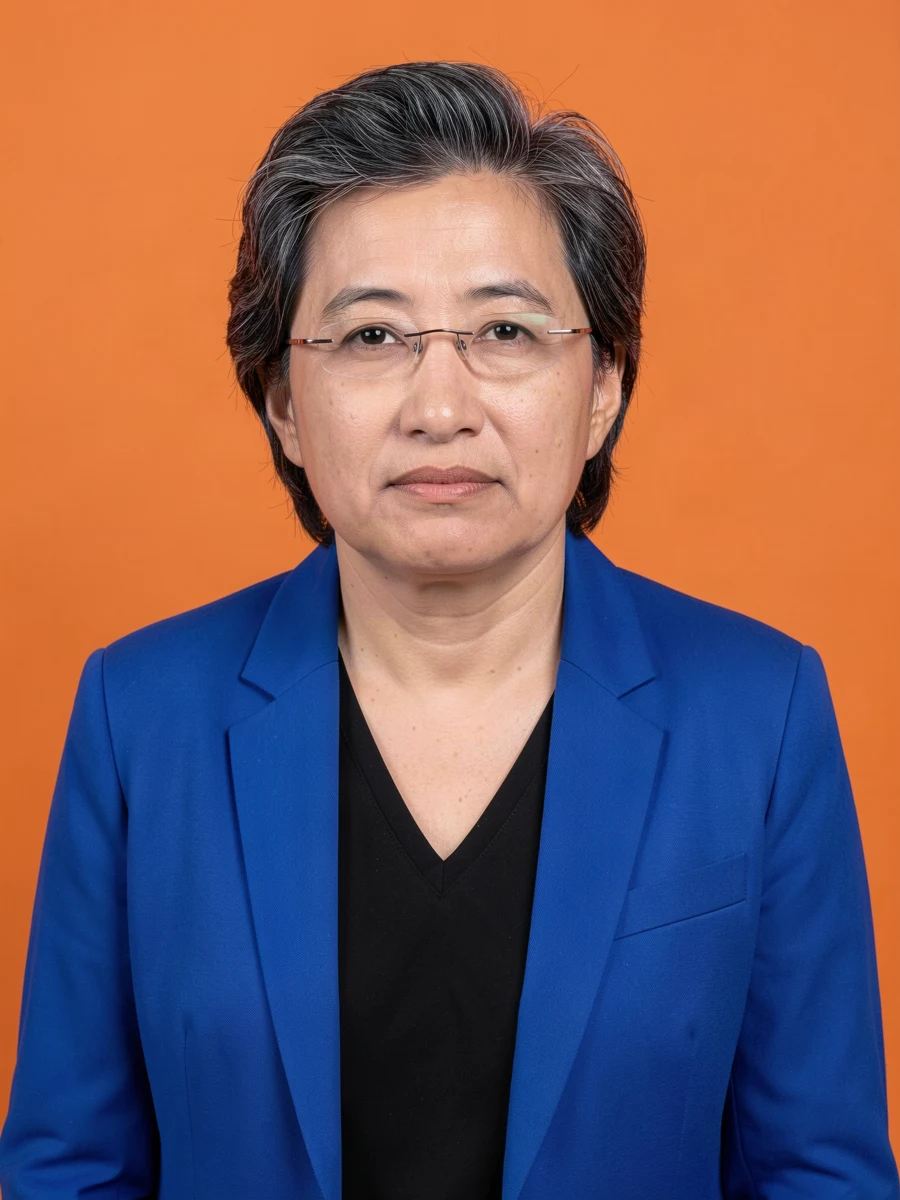 |
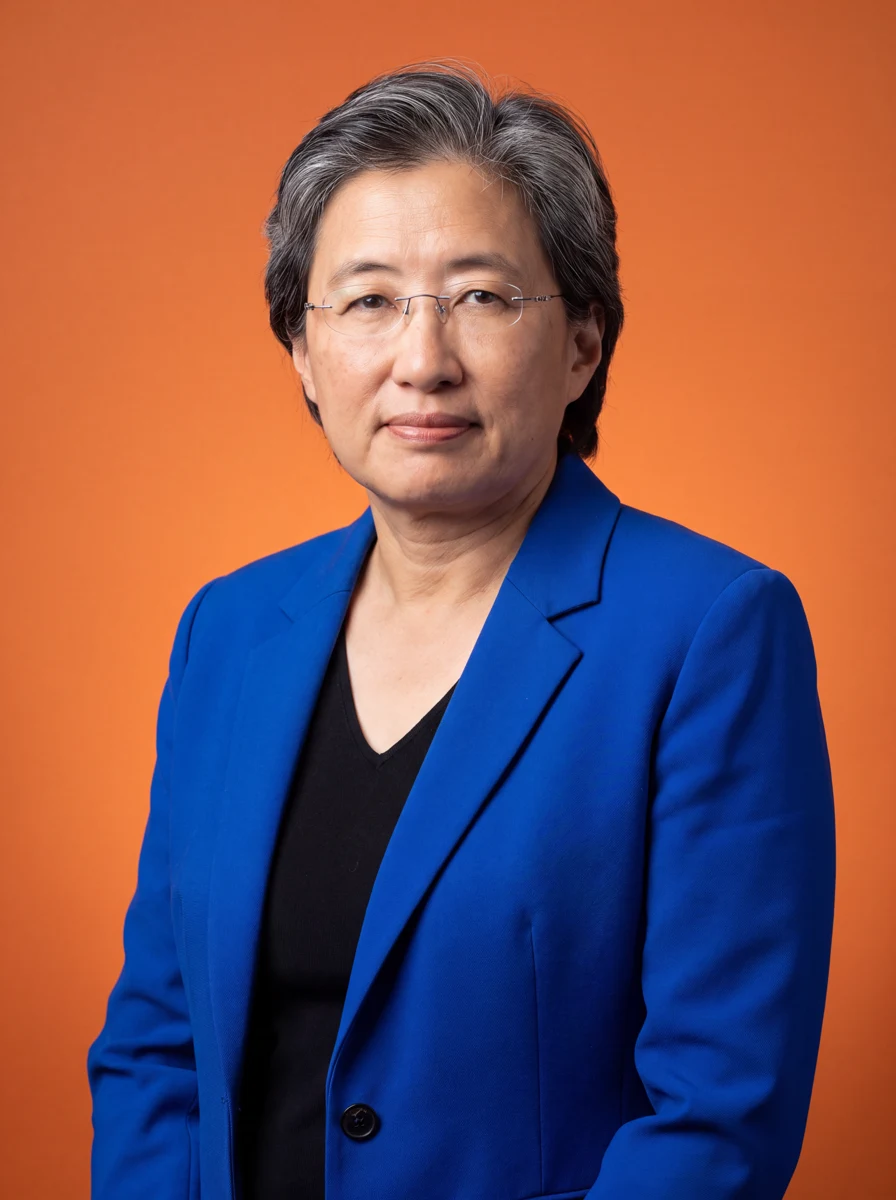 |
These stills were made from the two supplied photos. They were not extracted from the supplied video, and neither set was used as input to the new H3 Max clip. H3 Max received the original photos directly.
Nano Banana Pro illustrates our preferred photographic treatment here; Seedance 2.5 is the performance editor used by the recipe. In the live upload workflow, Vaaya validates and prepares your photos for Seedance without regenerating your face in an image model.
Watch both performance samples
MiniMax H3 Max — generated from the supplied photos
The video stream is preserved without re-encoding. We removed its output audio for a silent visual comparison with the supplied example.
The new H3 Max request uses the original photos, explicit performer assignments and the recipe’s seven-second source performance as its motion reference. We asked for photorealistic faces, natural lighting and realistic clothing. The FLUX portrait prompt was not used for this video.
Vaaya / ReAPI — supplied reference video
This is the supplied 25.5-second file, preserved without replacing its visuals or soundtrack. It has no audible soundtrack. Its length and export are properties of this supplied example, not the recipe’s seven-second Standard or 29-second Extended options. We did not generate a new ReAPI video or independently record the settings used for this existing sample.
Both clips keep the leather jacket on the left and the blue blazer on the right, with the orange set and hanging microphone intact. In the H3 Max clip, the right performer points forward, then turns toward the side. The longer supplied example also shows her turn her back to the camera and return. Those changes of angle are useful places to inspect facial consistency, hair and clothing.
The supplied example demonstrates a longer sequence, while H3 Max covers approximately seven seconds. We do not use that difference alone to declare a quality winner.
What to look for in both clips
| Detail | What a strong result should preserve |
|---|---|
| Character identity | A recognizable face through head turns and changes of expression |
| Performer placement | Each person remains on their assigned side, with two distinct identities |
| Wardrobe | The intended outfit’s recognizable colors, shape and details |
| Performance | Gestures, framing and timing that follow the source clip |
| Faces and hands | Coherent features during movement, including near the microphone |
| Finished playback | The expected clip length and the intended soundtrack |
Follow each person through the full clip. A good opening frame is only the beginning; the result has to hold together as they perform.
A prompt built for each character upload
“Put us in the video” leaves important decisions unstated. Which person goes where? Do two photos show one person or two? Should an outfit come from the source performance or the upload?
Vaaya turns those choices into explicit instructions. You assign the viewer’s left, right, or both performers. Each assigned person gets a separate set of one to five photos. The recipe then maps that set to the matching performer in the prompt.
With two people, it explicitly instructs the model to keep their identities separate, preserve their sides, and avoid putting one face on both performers. With one person, it asks the model to preserve the unassigned performer. Your creative notes are appended within those boundaries.
That means the prompt changes with the number of people, their assignments, their reference-photo counts and your notes. Each upload becomes part of an explicit character-to-performer mapping.
For example, you can ask: “Put me on the left and my friend on the right. Keep our outfits.” After you assign the photos, the recipe builds instructions around those choices:
| Your choice | What the recipe tells the model |
|---|---|
| Your photos assigned to the left | Replace the viewer’s left performer with the person in those references |
| Your friend’s photos assigned to the right | Use that separate identity and wardrobe for the right performer |
| Both performers selected | Keep two distinct people; do not swap sides or merge faces |
| “Keep our outfits” | Apply the wardrobe notes to both assigned people while preserving the source scene |
A clear face photo gives the model an identity reference; an outfit photo gives it wardrobe detail. Keeping each person’s photos together helps the recipe express exactly whose appearance belongs in each position.
A model selected for this performance
The Hotel Lobby recipe uses Seedance 2.5 through ReAPI in video-edit mode. It starts with the saved performance and instructs the model to preserve its motion, timing, camera and scene while replacing the assigned performers.
This is why the recipe matters. You are asking for a specific performance with your characters in it. The source clip carries the choreography; the reference photos carry identity and wardrobe; the prompt connects them.
The recipe pairs a selected video model with character-specific reference mapping and prompt construction. That is how each upload gets tailored instructions while every run follows the same performance-editing workflow.
The soundtrack is part of the result
The production workflow generates the visual edit, then restores the original saved clip’s audio with FFmpeg. It checks the duration and verifies that the final export contains an audio stream before delivering the MP4.
The result uses the soundtrack people recognize, with the saved performance as its timing reference. Lip synchronization still depends on the generated visual edit; restoring the audio ensures the finished file contains the original track.
Standard uses a seven-second saved clip. Extended uses 29 seconds from the same performance. You choose the length and the people; the recipe handles the photo preparation, performer instructions, video edit and final export.
How these samples were made
The supplied photos and video were added on September 27, 2026. We made a new image-edit request for each person with each image model: FLUX.2 [klein] 9B via its LoRA-capable edit endpoint, with no custom LoRA, and Nano Banana Pro via its edit endpoint. FLUX was requested at 1536 × 2048; Nano Banana Pro at 4K. Presentation images are resized WebP files, without retouching.
The revised FLUX prompt requests a photographic portrait with light editorial retouching. The Nano Banana prompt emphasizes photographic lighting and realistic surface texture. They share character references and intended outfits, but they are not identical-prompt model tests.
H3 Max received the original photo uploads directly, plus the saved seven-second Hotel Lobby source clip. It was requested at 1080P with prompt expansion disabled. Its video stream was copied without re-encoding and its audio removed for this silent comparison. The supplied Vaaya MP4 was copied unchanged; its generation inputs and settings were not independently verified in this session.
Read the prompts, model identifiers and asset provenance. The H3 Max reference endpoint supports image and video references; see fal’s API documentation.
Make the Hotel Lobby trend yours
For us, best-in-class means caring about all the details that make this particular trend work: recognizable characters, deliberate performer placement, the original performance and a complete, downloadable video.
Choose one or two people, add their photos, and tell Vaaya who belongs on each side. Use your own photos or photos of adults who have given permission.
Create your Hotel Lobby video with Vaaya.
Questions
What is the Migos AI trend?
The Migos AI or Hotel Lobby AI trend puts new characters into the familiar two-performer rap performance. Vaaya’s Colors recipe uses a saved performance clip and your character photos to make that transformation.
Can I replace both performers?
Yes. Assign one person to the viewer’s left and another to the viewer’s right, with a separate photo set for each. You can also replace just one performer.
Does every uploaded photo go through Nano Banana Pro?
No. Nano Banana Pro created the realistic demonstration portraits in this article. The production recipe prepares uploaded photos and sends them to Seedance 2.5 through ReAPI with a prompt built from the performer assignments.
How long is the Hotel Lobby video?
Standard is seven seconds and Extended is 29 seconds. Both use the saved performance and restore its original audio.